In this step you build and deploy the application you created in this tutorial to an Android device. Before you start this step make sure that you have a working Android build environment. See Installing the Kanzi build environment for Android.
To build and deploy your application to an Android device:
- Connect your Android device to your computer.
- Build and deploy your Kanzi application to your Android device. You can do this either in Kanzi Studio or on the command line using Scons:
- Using Kanzi Studio
- In Kanzi Studio open the <KanziWorkspace>/Tutorials/Programmer tutorial/Start/Tool_project/Programmer tutorial.kzproj project.
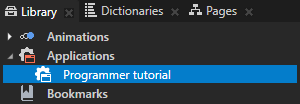
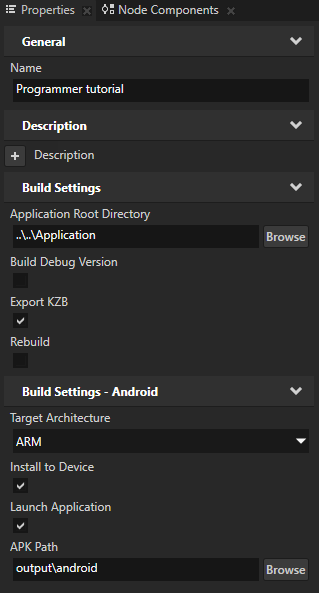
- In the Library select the Applications > Programmer tutorial configuration and in the Properties you can set the build configuration, including the target architecture.
- Select > Export > Build Android Package.
Kanzi Studio creates an Android package from your Kanzi Studio project, deploys, and runs it on your Android device.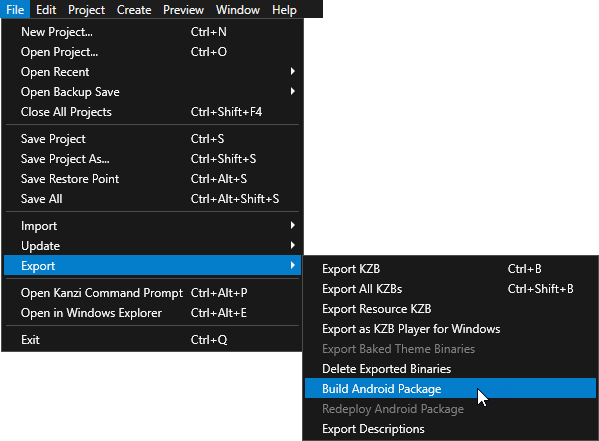
- On the command line
- Open the Kanzi Command Prompt.
- Go to the Android configuration directory:
cd <KanziWorkspace>\Tutorials\Programmer tutorial\Start\Application\configs\platforms\android - Run Scons:
scons es2 release
- Go to the Android output directory:
cd <KanziWorkspace>\Tutorials\Programmer tutorial\Start\Application\output\android - Run
adb installto install the apk package of your Kanzi application on your Android device:adb install –r ProgrammerTutorial-release.apk
- Using Kanzi Studio
What's next?
In this tutorial you learned how to use the Kanzi Engine API to access nodes and resources from the kzb file you created in Kanzi Studio, get and set the property values of Kanzi nodes, use custom property types, instantiate prefabs, load and play animations, load resources from the kzb file, use Kanzi messages to define events, and deploy the completed application to an Android device.
To learn more about how Kanzi works:
See also
To learn how to deploy your Kanzi application to different platforms, see Deploying Kanzi applications.
